Funding and disclosure information transfer procedure (Windows)
Updated: 6 November 2014
Version 1.1
Document Issue Date: October 2014
This document is the property of the Australian Electoral Commission. The information contained within this document is intended for release to the nominated recipients and is not to be copied without the consent of Australian Electoral Commission.
1. Introduction
1.1 Purpose
The purpose of this document is to detail the steps necessary to allow organisations, such as Australian Political Parties, to be able to securely transfer information to the Australian Electoral Commission (AEC) for the purposes of a disclosure audit.
This procedure has been developed to ensure:
- Security of external organisations data during the shipment of information to the AEC
- External organisations have a consistent and repeatable process for data transfer to the AEC
- External organisations are not burdened by cost both in terms of time and money
The protection of external organisation data is the sole-responsibility of the external organisation. The AEC is not liable for the loss or theft of external organisation data during the data transfer process.
1.2 Prerequisites
This document assumes the following prerequisites are in place:
- All encrypted information needs to be transported to the AEC on either CD-ROM or DVD media
- A password must be used to encrypt the external organisations data. Please pre-create a password ready to type in during the encryption procedure. The AEC recommends using a pass-phrase for the password, for example:
- A Passphrase example is "Birds of a feather flock together"
- The Password would then be "Birdsofafeatherflocktogether" making note to remove any spaces or special characters such as apostrophes
1.3 Assumptions
This document makes the following assumptions:
- The external organisation has access to the Internet
- The external organisation has the ability to download files from the Internet
- The external organisation has access to the Uniform Resource Locator (URL) – http://www.7zip.org
- The steps to install any required software are performed by personnel who have sufficient access on the desktop and or laptop device
- The external organisation is completing these steps on a Windows XP, Vista, 7 (or later)
2. Download
To download the software required to encrypt information prior to transfer to the AEC please complete the following steps:
Using an Internet Browser that has access to the Internet and the ability to download files navigate to the following URL:
- http://www.7-zip.org/
- Select the download option according to the required operating system, i.e. 32 or 64 bit Windows
- When prompted save the 7-Zip software to a local folder making sure to take note of the folder name and location
3. Installation
To install the software required to encrypt information prior to transfer to the AEC please complete the following steps:
- Using Windows Explorer navigate to the location used to store the 7-Zip installation file (.EXE)
- Double-Click on the file to start the installation wizard
Special Note: If using Windows VISTA or Windows 7 with User Account Control (UAC) select "Yes" when prompted by the operating system.
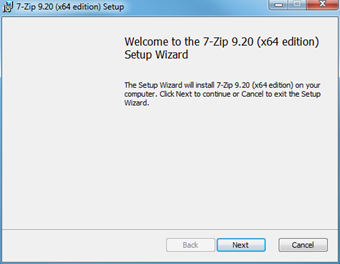
- When prompted by the Welcome dialogue box click "Next" to continue
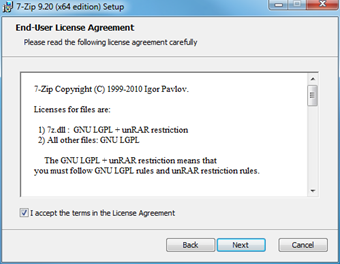
- Click "I accept the terms in the License Agreement" and then click "Next"
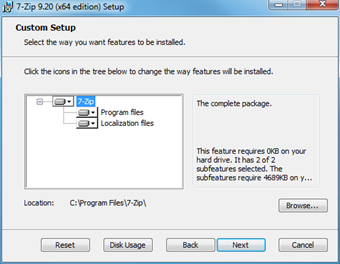
- Accept the default installation options and path then click "Next"
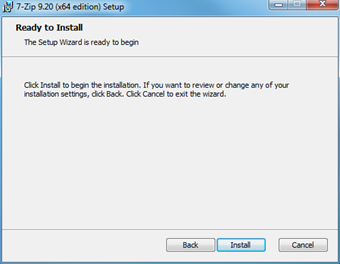
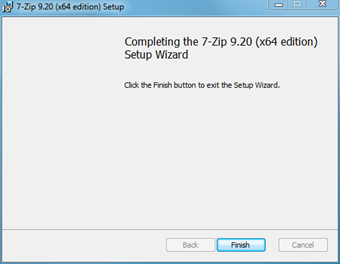
- Click "Finish" to complete the installation
4. Encrypting Data
To prepare data for transport to the AEC please complete these steps:
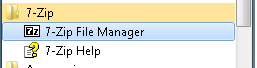
- Locate and execute "7-Zip File Manager" in the Start Menu
- In the File/Folder pane navigate to the Files/Folders that need to be sent to the AEC
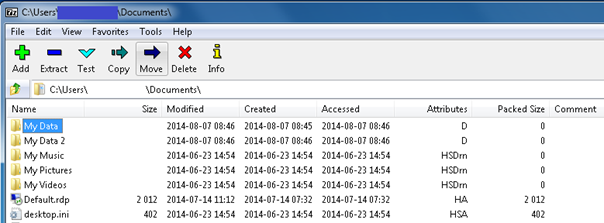
- Select the required File(s) and Folder(s) and then click "Add"

- Within the "Add to Archive" dialogue box
- Make note of the file name shown in the "Archive" field. For easy identification please change this name to reflect your organisation
- Select "AES-256" as the encryption method
- Select "Show Password"
- Enter a strong password into the "Enter Password" field
- Click "OK"
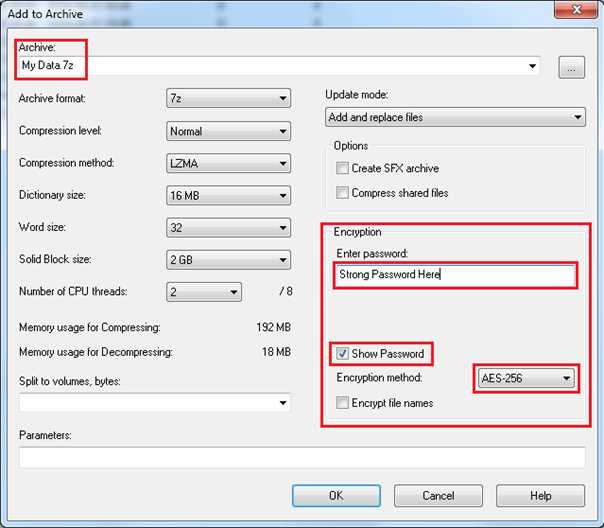
- 7-Zip will create a new file with the name supplied in the "Archive" field. Make note of the file location.
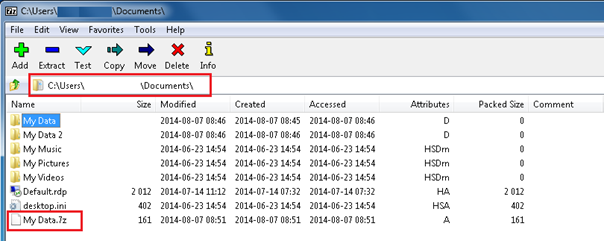
- The 7-Zip archive file is now ready to be sent to the AEC. Please place this file on CD-ROM or DVD and deliver it to the AEC.
- Please ensure the password/passphrase used to encrypt the data is NOT transported with the CD ROM/DVD. The password/passphrase should be provided separately to the AEC by either:
APPENDIX A. Abbreviations
The following abbreviations have been used in this document.
| Term or abbreviation |
Full name or description |
| AD |
Active Directory |
| AEC |
Australian Electoral Commission |
| AES |
Advanced Encryption Standard |
| UAC |
User Account Control |
| URL |
Uniform Resource Locator |